


Silly Fun Smile Live Wallpaper
4.862.00 Reviews
App Specs
- Version
- 1.1.1
- Updated On
- License
- Free
- Downloads
- 10,000,000+
- Developer
- Fusion Flow Tech
- Categories
- Personalization
- Platform
- Android
Screenshots
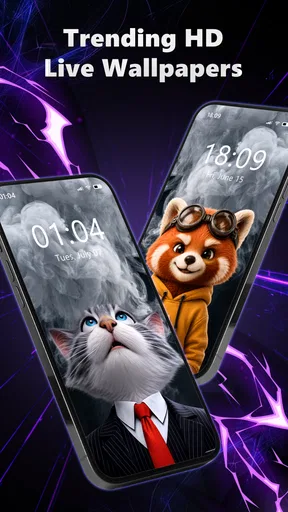
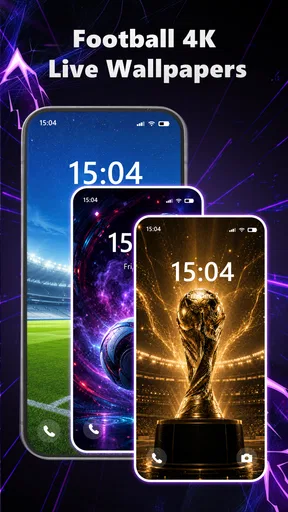
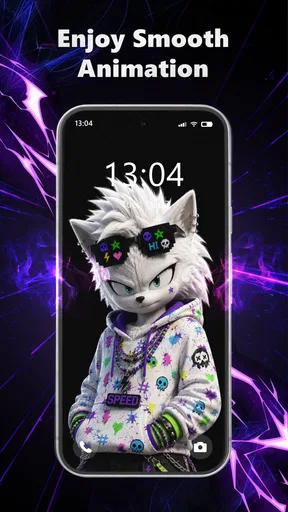
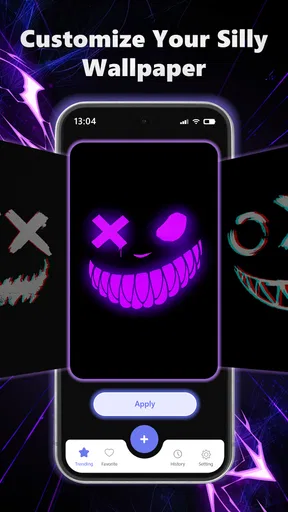
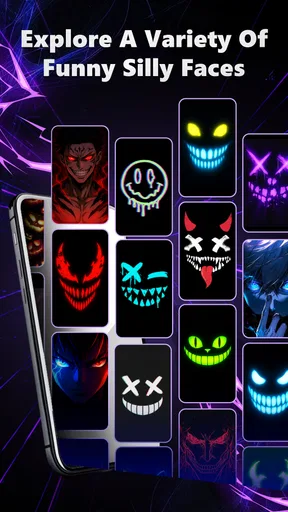
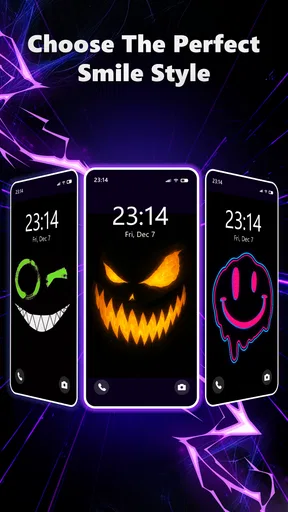
 Analysis by AppCompare
I tend to notice my wallpaper most when I unlock my phone for a quick task and then look at it again a few minutes later. Silly Fun Smile Live Wallpaper is aimed at making those repeated glances feel less plain, with animated smiley faces taking the place of a static background. It is a playful personalization app rather than a tool for organizing or changing how the phone works, so its appeal comes down to whether you enjoy a screen with a bit of motion and silliness.
What to expect when you first set it up
The basic idea is easy to understand: choose an animated look, apply it as your wallpaper, and let the expressions add some character to your home screen. The app is free, developed by Fusion Flow Tech, and sits in the personalization category. It is marked for everyone, so the concept is straightforward enough for a wide range of users, including someone setting a live wallpaper for the first time.
The key question is not whether the wallpaper can transform your phone into something entirely new; it is whether this particular style fits your taste and your everyday screen habits. Animated faces are deliberately lighthearted. That makes the app a natural fit for someone who likes bright, comic details, but a poor match for anyone who prefers a restrained home screen or needs wallpaper to stay visually quiet behind icons.
Speed expectations and keeping motion comfortable
Live wallpaper has a different feel from a still image because movement is always part of the presentation. I would treat the animation as a decorative layer, not as a reason to expect the phone to feel faster or more responsive. If you enjoy motion, the changing expressions can make an unlock feel more personal; if movement distracts you while you are searching for an app, a static background will probably be more comfortable.
One useful way to judge the effect is to try the wallpaper during ordinary use rather than admire it only on the setup screen. Look at it while opening a message, checking a calendar, or switching between home-screen pages. That gives you a better sense of whether the animation competes with your icons and widgets. A wallpaper that looks amusing for a few seconds can feel busy when you see it dozens of times a day.
For a calmer result, keep the arrangement visually simple where possible and pay attention to how much of the screen is covered. If you like an energetic look, a denser arrangement may suit you; if you rely on small app labels or widgets, less visual activity is often easier to live with. The practical trade-off is clear: more animation can make the wallpaper feel lively, while a quieter layout keeps the home screen easier to scan.
How it fits into heavy-use moments
The wallpaper is most noticeable during brief pauses: checking the time, returning to the home screen after a call, or picking up the phone while waiting for coffee. Those small moments are where a silly animated detail can add charm without requiring you to open a separate app. It is less compelling when you spend most of your day inside full-screen apps, because the wallpaper is not the main thing you see during those sessions.
Worth Reading Before You Choose

Baby Panda World Brings Quick Play to Modern Phones, but Its Game Library Feels Busy

ESPN’s Live Game View Makes Following Close Games Easier

QuizzLand Review: A Good Fit for Short Trivia Breaks, Not Every Player

Basketball Stars: Multiplayer Is Fast, but Can It Recover When Matches Go Wrong?

WEBTOON Turns Phone Updates Into a Better Reading Routine

Link to Windows Runs on Shared Habits, Not Social Feeds
Imagine you are waiting for a bus and unlock your phone to check when it arrives. The animated faces give the home screen a little personality while you glance at a widget or choose a messaging app. If you then need to read a long note or focus on a map, the wallpaper’s role drops away. That is a useful way to think about its value: it can make idle screen time more cheerful, but it does not improve the task you opened the phone to do.
It is also worth considering who else might see your screen. A playful wallpaper can be a conversation starter among friends or family, but it may not suit a formal setting where you want the phone to look understated. I would choose it for a personal device used casually, rather than assuming one animated design will feel appropriate in every context.
Personalizing without making the screen harder to use
The best wallpaper choice is not always the one with the most activity. Before settling on a look, check whether your most-used icons remain easy to identify and whether notifications stand out against the background. If the smiley faces draw your eye away from labels, try a less crowded arrangement or a more contrasting background. This is a small setup decision, but it can make the difference between a novelty you enjoy and one you replace after a day.
Think about your lock screen and home screen as separate viewing situations, too. A lively design may be fun when you unlock the phone, while a busy backdrop can make incoming notifications harder to glance at. If your device lets you choose where a wallpaper appears, consider using the animated look only where it remains comfortable to read. The point is not to maximize motion; it is to keep the charm without sacrificing legibility.
There is also a practical attention trade-off. People who often check their phones during meetings, study sessions, or focused work may prefer a still image because movement can invite another glance. For casual use, the animation is part of the appeal. For a screen you want to ignore until needed, a quiet wallpaper is the more sensible choice.
Reliability and realistic performance expectations
A live wallpaper is something you notice repeatedly, so consistency matters more than a one-time splashy effect. I would pay attention to whether the wallpaper continues to look and behave as expected after you leave the home screen and return to it. If it ever stops appearing as you intended, reopening the wallpaper settings and applying your preferred choice again is a reasonable first troubleshooting step before assuming the phone itself has a problem.
Performance can vary with the phone, its current workload, and the way it handles animated backgrounds. I would not promise that every device will behave identically, or assume a live wallpaper has no effect on battery use simply because the screen looks smooth. If battery life is already a concern, compare your usual day with the animation enabled and disabled, using the phone in the same way. That personal check is more useful than guessing from appearance alone.
When the phone feels sluggish, it is sensible to simplify the home screen and see whether the experience improves before blaming one app. Animated wallpaper is only one part of a device’s workload, alongside apps, widgets, and background activity. If you need the most predictable, low-distraction setup, use a static image; if you value the visual effect and your phone handles it comfortably, the animation may be worth keeping.
Device fit, alternatives, and who should choose it
The app’s current version is 1.0.3, and its minimum operating system requirement is Android 7.0. That makes the Android requirement a practical first check before spending time choosing a look. It has passed one million installs and has an average rating of 3.2 from 584 ratings, so reactions are mixed rather than universally enthusiastic. I would take that as a reason to judge the actual style and day-to-day feel for yourself, not as proof that it will or will not work well on your particular phone.
Compared with a static wallpaper, this app offers movement and a more playful identity, but a still image is simpler and usually better for people who prize a clean, quiet screen. Compared with broad wallpaper collections, its appeal is more specific: it focuses on silly smile imagery rather than giving you a wide range of unrelated themes. If you want to change your phone’s look often or match a precise color palette, a larger wallpaper library may be a better fit. If you want one cheerful animated idea, a focused app can be easier to decide on.
I would recommend trying it if you like cartoon expressions, enjoy customizing the home screen, and do not mind seeing the same playful motif throughout the day. I would skip it if you want a professional-looking device, need a very calm background, are sensitive to motion, or are trying to minimize anything that might add visual activity. The app is free, which lowers the barrier to trying it, but that does not make it the right choice for every phone or personality.
A quick way to decide whether it belongs on your phone
Before making it your everyday wallpaper, spend a normal stretch of phone use with it rather than judging it only during setup. Check your frequently used icons, read a notification, and return to the home screen after using a full-screen app. If the faces still feel amusing without getting in the way, the design is doing its job. If you find yourself noticing the animation when you are trying to focus, switch back to a static background instead of forcing yourself to like it.
Also consider whether you want a wallpaper for your own enjoyment or one that will look polished to other people. This design’s strength is its sense of humor, not subtlety. That distinction makes the choice easier: it is well suited to a personal phone used casually, while people who want a coordinated, minimal, or work-focused appearance will likely be happier with a still image or a more restrained theme.
Getting Started with the Smiles
Setting up Silly Fun Smile Live Wallpaper is a breeze. Just download it from your app store, and you're greeted with a cheerful interface that's just waiting to brighten up your screen. Once installed, you can choose from a variety of smiley faces that dance around your home screen, each with its own quirky expression.
The app is surprisingly intuitive. Even if you’re not tech-savvy, you’ll find it easy to navigate through the options. Just a few taps, and your phone is transformed into a canvas of happiness. And trust me, having those little faces winking and grinning at you throughout the day? It’s a mood lifter, for sure!
Customization and Features
One of the things I love about this app is the level of customization it offers. You can tweak the speed, size, and number of smiley faces that appear on your screen. Want a frenzy of smiles? Crank up the number! Prefer a more relaxed vibe? Slow them down to a gentle float.
The app also includes some cool interactive features. Tap on a smiley, and it might wink or make a funny face. It’s these little touches that make the app feel alive and engaging. Plus, there’s an option to change the background color, so you can always keep things fresh and exciting.
Why You'll Love It
If you're anything like me, you know how monotonous a phone screen can get. That’s where this app shines—literally. It injects a dose of fun into your daily routine, and it’s amazing how a simple change can brighten your mood. Plus, it’s a great conversation starter! Friends often ask me about the cute little characters floating around on my screen.
Performance-wise, the app runs smoothly without draining your battery, which is a huge plus. I’ve had no issues with lag or crashes, making it a reliable choice for anyone looking to spice up their phone’s aesthetics.
In a world where we’re all glued to our screens, why not make the experience a little more enjoyable? Silly Fun Smile Live Wallpaper does just that. It’s a small change with a big impact, and I’m all for anything that adds a bit of joy to my day.
Pros
- Vibrant and eye-catching animations.
- Minimal battery consumption.
- Easy customization options.
- Compatible with most devices.
- Frequent updates enhance features.
Cons
- Limited free features available.
- May lag on older devices.
- Ads can be intrusive at times.
- Customization can be overwhelming.
- Requires internet for updates.
FAQs for Silly Fun Smile Live Wallpaper
What is Silly Fun Smile Live Wallpaper and how does it work?
Silly Fun Smile Live Wallpaper is a dynamic app designed to bring animated smiles and vibrant backgrounds to your device's home screen. Once installed, users can choose from a variety of playful smiley faces and backgrounds that react to touch and movement, adding a lively and fun element to your phone.
Is Silly Fun Smile Live Wallpaper compatible with all devices?
The app is compatible with most Android and iOS devices. However, performance may vary depending on the operating system version and hardware capabilities. It's recommended to check the app's compatibility details in the app store to ensure it works smoothly on your specific device.
Does using Silly Fun Smile Live Wallpaper affect my battery life?
Live wallpapers, including Silly Fun Smile, can impact battery life since they continuously run in the background. However, the app is optimized to minimize battery usage, ensuring that it does not significantly drain power while still providing a vibrant display.
Are there customization options available in Silly Fun Smile Live Wallpaper?
Yes, the app offers a variety of customization options, allowing users to select different smiley faces, adjust animation speeds, and change background colors. This flexibility ensures that you can personalize the wallpaper to match your mood or style preferences.
Is Silly Fun Smile Live Wallpaper free to download and use?
The app is available for free download, offering a selection of basic features. However, there may be in-app purchases for additional customization options and premium content. It's important to review any potential costs within the app to avoid unexpected charges.


